
Enumeration with Nmap
Pentesting-Ports

Table of Contents
- Enumeration with Nmap
- Identify open ports with Nmap
- TCP Enumeration
- UDP Enumeration
- Directory and file search
- Relevant information search
- SSH brute force
- DNS brute forcing
- Obtain a copy of the configuration from a poorly configured CMS
- Versions and possible vulnerabilities
- Enumerate users on SMB
- WordPress enumeration
- HeartBleed attack
- Banner grab
- Check if vulnerable to shellshock
- Port Scanning
Nmap
Identify open ports with Nmap
Here is a graphic representation of what happens when we launch the different scans and how the communication works
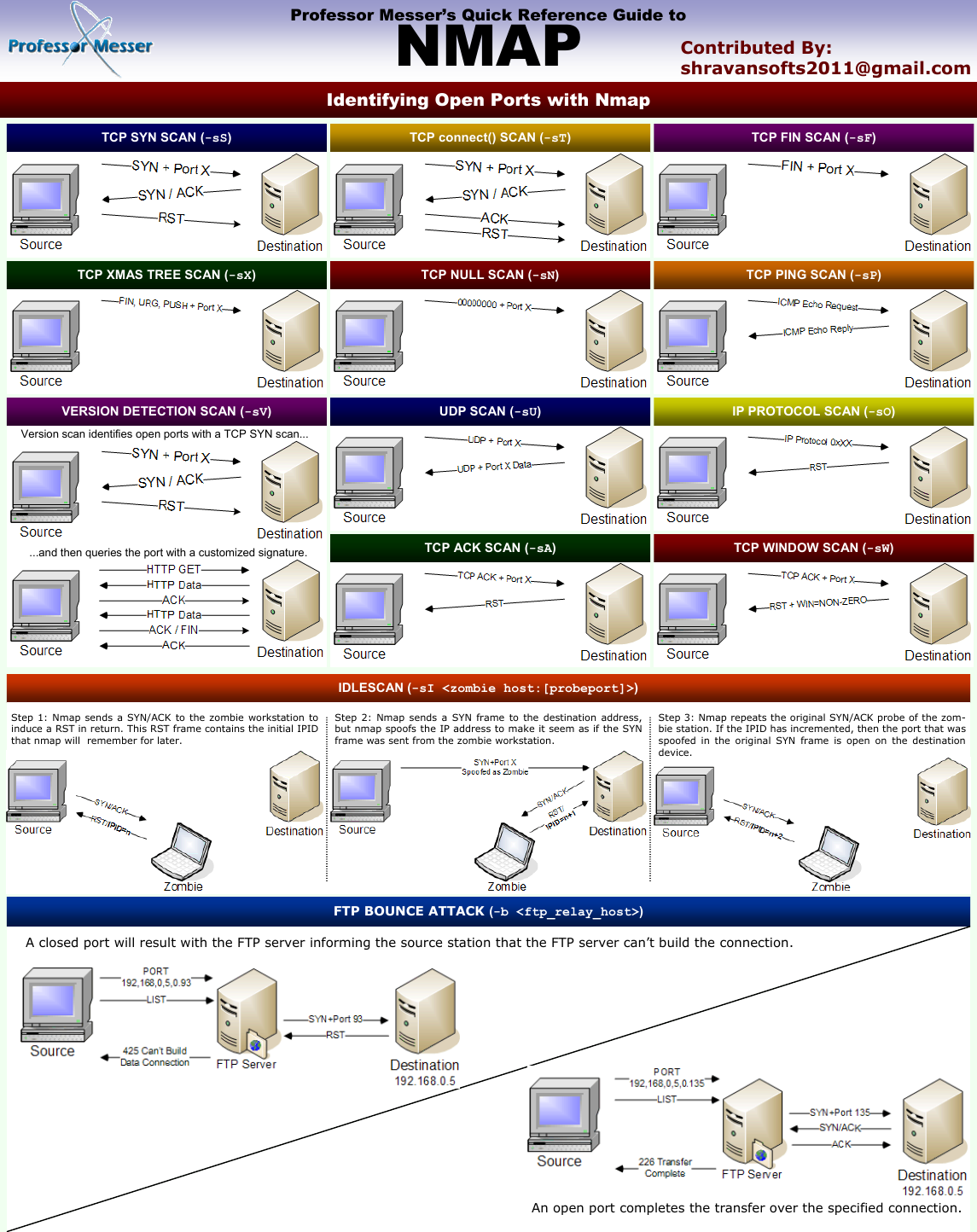
Nmap is a very extensive tool and has many possibilities, in CTF the command I use most is this one, and depending on the result I get, I perform other types of scans.
nmap -sCV --min-rate=5000 10.10.11.4 -Pn -vvv -oN targetedOnce the scan is finished, it is saved in grepable format
This command performs a comprehensive scan, identifying open ports, service versions, and OS details of the target.
nmap -p- -sT -sV -A $IP
-p-: Scans all ports (1-65535).-sT: Performs a TCP scan (complete TCP connections).-sV: Tries to determine the version of services running on open ports.-A: Enables OS detection, version detection, and script scanning.$IP: The target IP address.
This command executes security scripts and vulnerability detection on open ports, providing detailed information about potential security issues.
nmap -p- -sC -sV $IP --open
-p-: Scans all ports (1-65535).-sC: Executes security scripts and vulnerability detection using Nmap's scripting engine.-sV: Tries to determine the version of services running on open ports.--open: Displays only open ports in the result.$IP: The target IP address.
This command focuses on running specific Nmap scripts designed to detect and assess vulnerabilities in services and systems on the target.
nmap -p- --script=vuln $IP
-p-: Scans all ports (1-65535).--script=vuln: Executes specific scripts related to vulnerabilities.$IP: The target IP address.
TCP Enumeration
# Active port scanning
sudo nmap -p- --open -sS --min-rate 5000 <IP> -n -Pn -oG AllPorts

# Version enumeration -> Additional information
sudo nmap -sCV -p<PORTS> <IP> -oN targeted
UDP Enumeration
# Enumeration of top-ports using UDP protocol
sudo nmap -sU --top-ports X --open -T5 -v -n <IP>
Certainly, here are the Nmap scripts separated:
Directory and file search:
nmap -n -p<PORT> --script http-enum <IP>
# Pass parameter from where to start searching:
nmap -n -p<PORT> --script http-enum --script-args http-enum.basepath=<PATH> <IP>
Relevant information search:
nmap -n -p<PORT> --script http-grep <IP>SSH brute force:
nmap -n -p22 --script ssh-brute \
# To pass wordlists as arguments:
--script-args userdb=usernames.txt,passdb=passwords.txt <IP>
DNS brute forcing:
nmap -p<PORT> --script dns-brute <DNS>Obtain a copy of the configuration from a poorly configured CMS:
nmap -n -p<PORT> --script http-config-backup <IP>Versions and possible vulnerabilities:
nmap -sV -p<PORT> --script=vulscan/vulscan <IP>Enumerate users on SMB:
nmap -n -p139,445 --script=smb-enum-users --script-args=smbusername="test",\ smbpassword="test123" <IP>
    # It can be added: ,samronly and ,lsaonly at the end
WordPress enumeration:
nmap -n -p<PORT> --script http-wordpress-enum <DNS>HeartBleed attack:
nmap -sV -p443 --script=ssl-hearbleed <DNS>Banner grab:
nmap -n -p<PORT> --script dns-nsid <IP>Check if vulnerable to shellshock:
sudo nmap --script http-shellshock --script-args uri=<URL_FILE_SH> -p80 <IP>Port Scanning
Each one has its way of enumerating ports/services running under a system. I usually follow these steps.
Initial scan of open ports on the system
nmap -p- --open -T5 -v -oG allPorts ipHost -nService enumeration and versioning for discovered ports on the system
nmap -p$(cat allPorts | grep -oP '\d{2,5}/open' | awk '{print $1}' FS="/" | xargs | tr ' ' ',') -sC -sV ipHost -oN targetedIn case of having a slow initial scan, I usually apply the following variant
nmap -A -T4 -v ipHost -oN miscThis scan does not encompass all ports, and we are probably skipping some interesting ones that escape this scan. In that case, we can go aggregating search ranges in order to determine the ports that are open (Since launching the -p- when nmap takes a long time tends to stop the scan making it incomplete):
nmap -p1-10000 --open -T5 -v ipHost -n -oG range1-10000
nmap -p10000-20000 --open -T5 -v ipHost -n -oG range10000-20000
nmap -p20000-30000 --open -T5 -v ipHost -n -oG range20000-30000
In case of having an HTTP service running under a port, we can take advantage of the http-enum.nse script from nmap to enumerate directories and files of the web service (It has a small dictionary but it can serve us to have a quick overview of the hosted resources):
nmap --script=http-enum.nse -p80,443,8080 ipHost -oN webScanVisualization of categories for nmap scripts
grep -r categories /usr/share/nmap/scripts/*.nse | grep -oP '".*?"' | sort -uThese categories are all that nmap has, being able for example for an FTP or SMB service to apply the following categories:
nmap -p21,445 --script="vuln and safe" ipHost -oN vulnSafeScanRegarding the Low Hanging Fruit, interesting ports to look for in our initial scans can be the following (There are many more, but they correspond to services that can guarantee the execution of remote commands on the systems):
nmap -p21,1433 192.168.1.0/24 --open -T5 -v -n -oN LHFRegarding the FTP service, it is interesting to check if we can upload files. In case of having an IIS, if we see that we are able to host an asp/aspx file and point to it from the web service, we can establish a reverse TCP connection.
Last updated on